
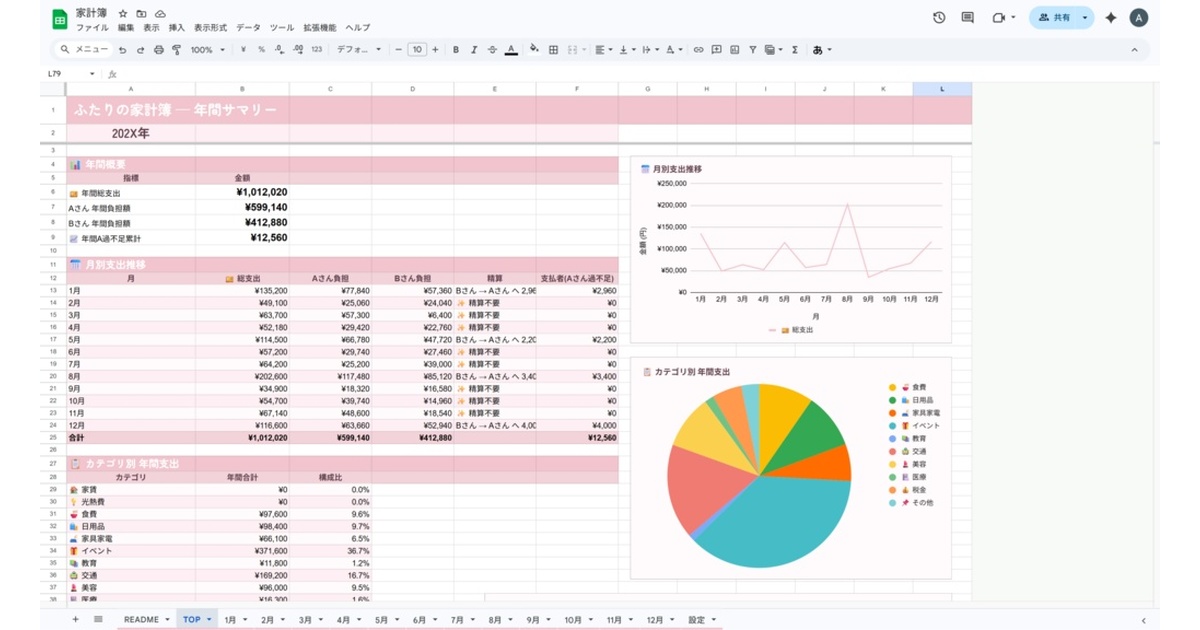
Stop recalculating “who paid more” every month
When two people merge their finances, the thing that breaks first isn’t budgeting — it’s reimbursement. Rent goes on one card. Groceries get paid by whoever is standing there. Every so often the shared card buys something personal. Run that for a month and nobody can say who actually paid more.
The Sakura Duo edition takes that arithmetic away from you. It’s the original sakura-pastel colorway in the Futari Kakeibo series.
Note: The template and all UI/labels are in Japanese. It’s intended for Japanese-speaking households.
What’s in the file
- Settings sheet (names, split ratio, accounts)
- Category and payment-source master
- Monthly sheets × 12 (auto-calculation, auto-settlement)
- TOP sheet (annual summary, charts)
- README walking through first-time setup
Setup is three steps
1. Set names and the split ratio
Enter both names on the settings sheet and decide how shared expenses get divided. 50:50 works, and so does 60:40 or 70:30 if your incomes differ. Set it once and you never think about the ratio again.
2. Register the cards and accounts you use
Add your real cards and accounts to the payment-source master. After that, logging an expense is just picking one from a list.
3. Log spend on the monthly sheet
Enter date, amount, category, payment source and liability. Apportionment and settlement are calculated for you, and at month end the sheet prints a line like “B owes A ¥12,800.”
Payment source × liability absorbs the three awkward cases
The core idea is that every amount carries two separate facts: who paid it, and who should bear it. Choose the liability type and the rest is worked out for you.
- Shared — rent goes on one card. Split by your configured ratio.
- Reimbursement — you bought your partner’s clothes on your card. The full amount shifts to them.
- Miscoded — the shared card paid for something personal. Change the liability and it cancels out.
Between those two axes, almost everything a two-person household spends can be expressed. And because the settlement figure follows whatever you pick, fixing a mistake means changing one cell — not recomputing the month.
The twelve categories separate the expenses that cause arguments
Rent, utilities, groceries, household goods, furniture and appliances, events, education, transport, personal care, medical, taxes, other.
The big movers are rent, utilities and groceries — but the ones that actually cause friction are the discretionary lines like personal care and events. Those get their own categories, so the annual summary and the category breakdown on the TOP sheet tell you whether the thing to revisit is a specific expense or the split ratio itself.
No macros
There are no macros and no Apps Script, so nothing asks you to approve extra permissions. Copy it into your own Google Drive and it works, on a free account, from a phone, laptop or tablet. It’s a one-time purchase with nothing to renew.
Try it before buying (free trial)
“Does it really work out the settlement on its own?” is faster to answer by touching it than by reading it, so there is a free trial covering January only.
Download the trial (Excel, 26KB)
Open it and the January sheet already contains sample transactions, with the settlement line reading “B さん → A さん へ 32,840 円” (B owes A ¥32,840). Change an amount or a liability split and the figure — and its direction — updates on the spot. That is the core of the paid workbook. The settings sheet lets you change the names, the split ratio (60:40 by default), and the cards / accounts.
What the trial leaves out: the February–December sheets, and the annual summary on the TOP sheet (monthly trend, yearly running total). The palette is the Sakura Duo edition.
The three colors are the same workbook
Sakura Duo, Muted Linen and Sky Apricot share identical sheets, logic and categories. Only the palette differs — pick whichever matches the room.
- Price: ¥980 (incl. tax)
- Free trial: January-only trial (Excel)
- Distribution: BOOTH (product page)
- Format: Excel / Google Sheets
- Color variations: Muted Linen edition / Sky Apricot edition
- Series: Password Manager Sheet (second release in the Digital Inventory Series)