
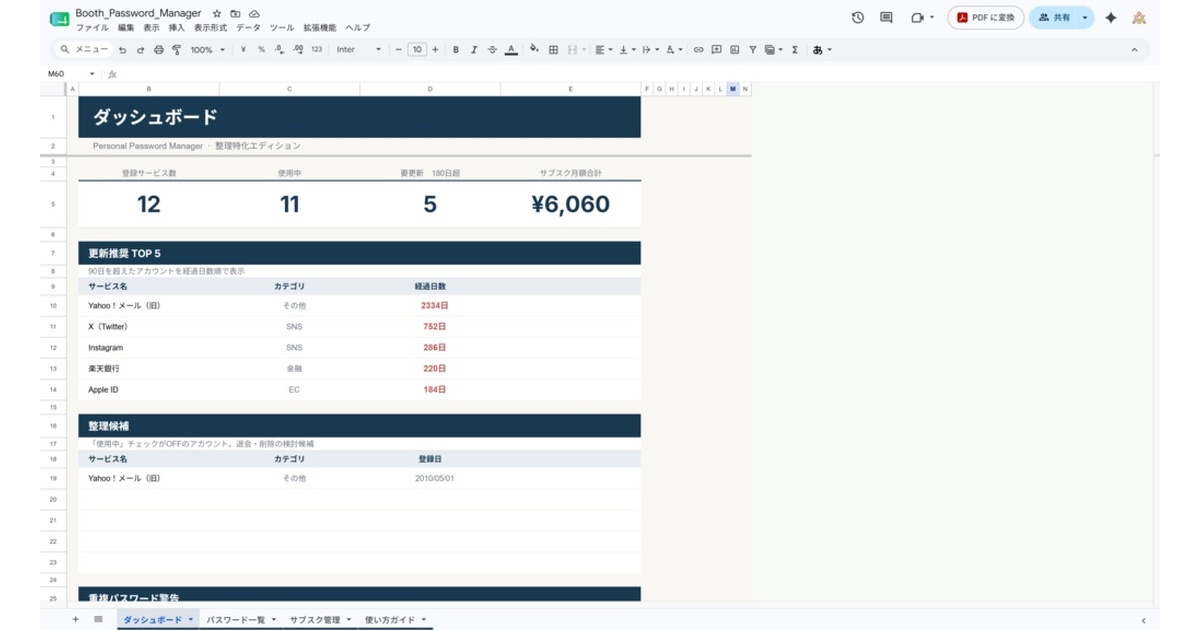
A one-sheet inventory for “how many subscriptions am I actually paying for?” and “which logins have I been recycling the same password on?” Pure Google Sheets — no Apps Script, no extensions.
Three tabs: a dashboard, a password list, and a subscription tracker. The dashboard surfaces total accounts, in-use vs. due-for-rotation, monthly subscription total, a top-five “rotate next” list, and category share (SNS / e-commerce / finance / etc.). You only fill in six fields per row — service name, email, password, category, last-updated date, and monthly cost — and seventeen other fields are computed for you, including strength score, duplicate detection, and monthly-equivalent costs for annual plans.
If you register a financial account without 2FA enabled, the row turns red as a hard warning. It’s not a replacement for 1Password or Bitwarden — it complements them by covering ground a dedicated password manager doesn’t (subscription cost rollup, category inventory, dormant-account cleanup).
Note: The template, dashboard labels, and inline guidance are in Japanese. It’s designed for Japanese-speaking users.
Second release in the “Digital Inventory Series.” The first is Futari Kakeibo.
When to use it
- You’re shopping for a 1Password replacement after the price hike: Inventory what you actually have before committing to a new dedicated tool, so you understand which features you genuinely need.
- Your subscription footprint has crept up and you’ve lost track: Netflix / Spotify / Adobe / cloud storage / AI tools — pull them onto one sheet and let it sum monthly, annual, and average spend.
- You want to clean up dormant accounts: Flag unused logins as “to-cancel” and review the list every six to twelve months.
Compared to a dedicated password manager
This sheet is built to complement dedicated tools like 1Password, Bitwarden, or Dashlane — not replace them.
| This sheet | 1Password / Bitwarden / etc. | |
|---|---|---|
| Browser autofill | × | ◯ (extensions) |
| Encrypted cross-device sync | × | ◯ |
| Subscription monthly / annual rollup | ◯ | △ (some) |
| Category-based inventory | ◯ | △ |
| Surfacing dormant accounts | ◯ | × |
| Pricing | One-time ¥980 | Subscription (~$36+ /yr) |
The split: a dedicated tool secures the login flow, and this sheet gives you the bird’s-eye view and cleanup workflow.
FAQ
Q. Doesn’t this store passwords in plain text? A. Yes — if you paste passwords directly, they’re plain text in the cell. Enable Google account 2-step verification, restrict sharing to “owner only,” and for financial accounts, store the primary password in a dedicated tool and just note “stored in [tool]” on the sheet.
Q. Does it work in Excel?
A. Google Sheets only. The dashboard relies on functions like QUERY and IMPORTRANGE that don’t exist in Excel, so the file breaks on import. An Excel port isn’t on the roadmap.
Q. Is it for personal use only? A. Yes — Personal Edition is licensed for a single user. For teams or families, the recommended pattern is one copy per person rather than a shared file, since shared editing makes 2FA ownership unclear.
- Price: ¥980 (incl. tax)
- Distribution: BOOTH (product page)
- Format: Google Sheets
- Series: Futari Kakeibo (first release in the Digital Inventory Series)